Mappings
The Mappings tab is where you translate your own PrestaShop values into the values Octopia expects — for the specific fields you chose to map onto an existing feature/attribute in a model.
It exists for one reason: a large catalog usually already has its own features/attributes, filled on thousands of products, and those values rarely match Octopia's approved list (your Used vs Octopia's Good condition). Instead of recreating everything, you reuse what you have and set the correspondence here — once per value, not per product.
What shows up here
Only specific fields saved in a model with "Use an existing feature/attribute" appear on this tab. Fields set to Create (a new object pre-filled with Octopia values) don't need any correspondence, so they're not listed. Configure the field in the Models tab first and save the model — then it appears here.
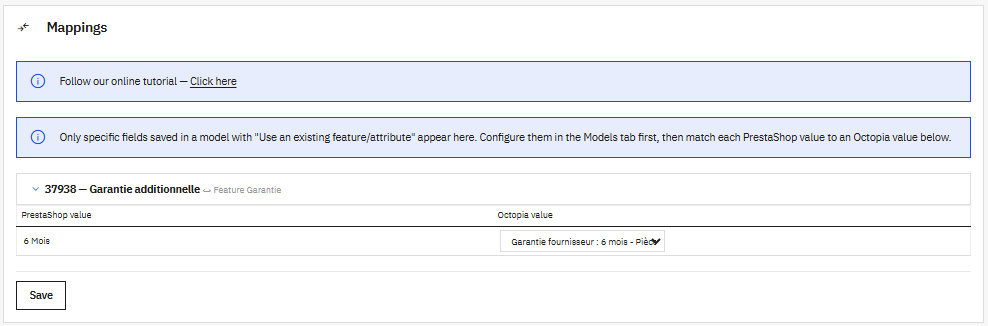
How it works
Each mapped field is a collapsible block titled with the Octopia field and the PrestaShop feature/attribute it reuses — for example 37938 — Additional warranty ↔ Feature Warranty. Expand it to reveal a two-column table:
| Column | What it is |
|---|---|
| PrestaShop value | A value from your feature/attribute (e.g. 6 months) |
| Octopia value | The Octopia value it should become (e.g. Supplier warranty: 6 months - Parts) |
For each PrestaShop value, pick the matching Octopia value from the dropdown. When you're done, click Save — the whole tab is saved at once.
Only what you map is sent
A PrestaShop value with no Octopia correspondence sends nothing at export for that field — the product simply won't carry that value. Map every value you want published.
Rename-safe
Correspondences are stored by value ID, not by text. Renaming a value in PrestaShop (or in Octopia's label) never breaks a mapping. If you delete the reused feature/attribute in PrestaShop, its correspondences are cleaned up automatically.
Multi-account behavior
The tab lists the fields of the active account: those mapped to Use existing in that account's models. Switch account and the list changes.
The value correspondences, however, are global — they aren't tied to an account. A correspondence you set (e.g. 6 months → Supplier warranty: 6 months) applies to every account that reuses the same feature/attribute. You set it once, it applies everywhere. This is consistent with created features/attributes, which are also shared across accounts (see the Models tab).
At export
When you publish offers, the module reads the product's PrestaShop value, looks it up in this table, and sends the Octopia value in its place. No correspondence for that value → nothing is sent. Fields created with Create as… don't go through this step: their values are already Octopia's, so they're sent as-is.
Next step
Transport — match Octopia's delivery modes to your PrestaShop carriers and shipping costs.